Gallery - Photo Gallery
- 4.6
- Rating
- 10.00M
- Installs
- Free
- Price

 Analysis by App-foxy
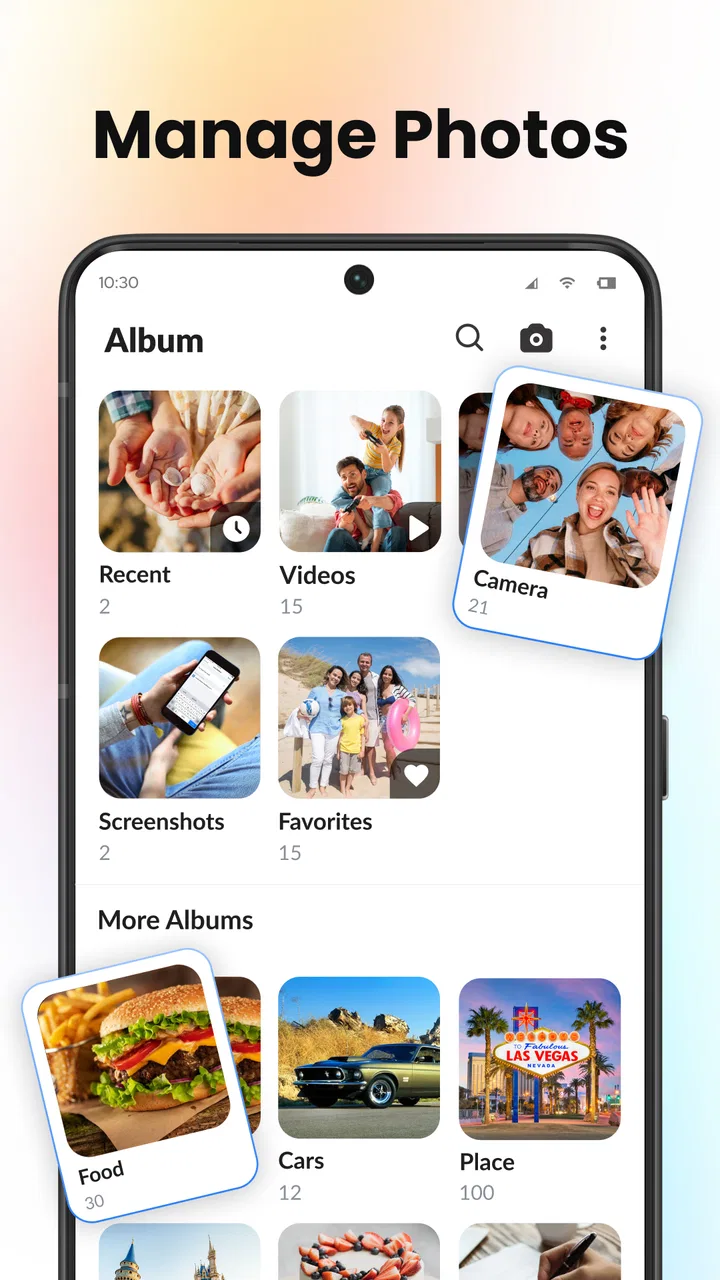
I spent time with Gallery - Photo Gallery as a practical photography app rather than treating it like a simple picture viewer. Its main job is to give photos and videos a more manageable home: browsing albums, opening media, and keeping selected pictures out of casual view. That sounds straightforward, but it addresses a problem many phone users know well: a camera roll that becomes difficult to search, sort, or use comfortably after years of screenshots, downloads, family photos, and short clips.
The app is developed by iStrom Apps and is available free of charge. It is rated for Everyone, which makes its straightforward purpose suitable for a broad audience. The current release is version 1.4.8, and it requires iOS 11 or later. Those details matter because this is not positioned as a specialist editing suite or a cloud photography service. I approached it as a focused gallery replacement for people who want to handle existing media with less clutter.
How Gallery - Photo Gallery feels in daily use
The first thing I noticed is that the app is centered on organizing photos and videos, not transforming them. There is no need to learn a timeline editor, understand camera controls, or build a complicated catalog before getting useful results. I could think in familiar groups: recent images, albums, personal pictures, saved files, and videos. That makes the app easy to understand for someone who wants a calmer way to browse a growing library.
You May Also Like

 Blood Strike: 2.5 Anniversary
Blood Strike’s Loadouts Turn Every Drop Into a Tactical Gamble
A close look at Blood Strike’s custom loadouts: how fast access to signature weapons reshapes its battle royale rhythm, rewards preparation, and narrows the gap between fights.

 Pandora - Music & Podcasts
Pandora’s Music Is Easy to Start, but Harder to Recover
Pandora’s strength is its low-effort path from a seed to a station. Its weak spot is how much confidence it asks you to place in connection, setup, and quiet recovery.

 8 Ball Pool
 Is Built on Rivalries, Rematches, and Routine
A close look at the rivalries, rematches, shared routines, and unanswered safety questions that turn a quick pool match into a persistent mobile community.

 Samsung Music
’s Quiet Strength Is Playing What You Already Own
Its reach comes less from spectacle than from dependable access to a personal library. That simplicity is both the app’s strongest retention engine and its ceiling.

 AccuWeather: Weather Radar
AccuWeather Review: A Quick, Clear Forecast for Everyday Decisions
For everyday plans, the best forecast is the one you can understand quickly. AccuWeather makes rain timing, radar, and local conditions easy to act on, with a few trade-offs.

 Hill Climb Racing
Why Hill Climb Racing Still Turns Crashes Into One More Run
A tiny car, a bumpy hill and one more upgrade: Hill Climb Racing keeps resurfacing because its simple chaos makes every near-miss feel personal.
More From Our News Desk
View All News


A realistic use case is a busy weekend away from home. I might return with camera shots, screenshots of tickets, downloaded restaurant menus, and several videos. In the default camera roll, those items can become one long stream. A dedicated gallery gives me a reason to separate the useful memories from temporary material, then keep the content I do not want immediately visible in a more private area. The benefit is not dramatic editing; it is reducing the small amount of friction that appears every time I open my media library.
The app’s store summary highlights album management, hiding media, and viewing pictures and videos. In my view, those functions work best when treated as separate habits. Albums are for finding things later, while hiding is for reducing exposure during ordinary browsing. Mixing those purposes can create confusion, so I would use albums for organization and the private area only for content that should not appear in the normal gallery flow.
A cleaner approach to albums
Albums are most useful when they reflect how I actually retrieve pictures. Instead of creating a separate album for every small event, I would keep a few durable groups, such as family, work references, travel, and documents. This prevents the app from becoming another layer of clutter. The important insight is that a gallery can only feel organized if the categories are simple enough to maintain after the initial setup.
I also found that album thinking helps with screenshots. Screenshots often have a short life, but some become useful references. Moving the ones I need into a purposeful group makes them easier to find later and keeps the main photo stream from becoming a storage bin for reminders. This is a small workflow, yet it is more valuable than repeatedly scrolling through hundreds of thumbnails.
For videos, the same principle applies. Short clips can be harder to locate than photos because they are less visually distinct in a long feed. Keeping videos in a dedicated album, or at least reviewing them separately, makes it easier to decide what deserves long-term space. The app is therefore more useful to me when I treat it as a media filing cabinet instead of merely a replacement for the default viewer.
What hiding media is good for—and what it is not
The hiding function is one of the more practical reasons to consider this app. I can imagine using it for personal images, surprise gifts, travel documents, or anything I do not want appearing while showing someone another photo. It is especially helpful in social situations where handing over a phone can lead to accidental swipes through unrelated media.
However, I would not confuse hiding with a complete security strategy. The feature is valuable for keeping items out of ordinary view, but users with highly sensitive material should still think carefully about device access, backups, and who can unlock the phone. The app’s appeal here is discretion during everyday browsing, not a promise that replaces every privacy measure provided by the operating system.
There is also a practical trade-off: hidden media becomes less convenient to reach. That is the point, but it means I would avoid hiding items that I need several times a day. A better workflow is to hide content that should remain available but rarely visible, while keeping frequently used documents in a clearly named album. That balance prevents the private area from becoming a second messy archive.
Viewing photos and videos without overcomplicating things
For ordinary viewing, simplicity is a strength. I do not need a photography background to understand the purpose of the app. It is aimed at opening media, moving through albums, and making the library easier to navigate. That makes it a natural fit for people who find feature-heavy photo managers tiring or who simply want a more direct route to their own files.
At the same time, users looking for advanced editing should set expectations correctly. This is a photography app in the sense that it manages photographic media; it is not the kind of tool I would choose for detailed retouching, layered compositions, professional color work, or a full creative workflow. For those tasks, a dedicated editor remains the better option. Gallery - Photo Gallery earns its place before editing begins: it helps me locate and arrange the material I may later edit elsewhere.
The same distinction matters when comparing it with cloud-centered photo services. A cloud service may be better for automatic backup, cross-device access, search across a large account, or sharing with family. This app is more appealing when my priority is direct local browsing and simple album control. I would choose based on the problem I am trying to solve rather than assuming every gallery app should replace a backup service.
How it compares with a phone’s usual gallery
The built-in gallery is convenient because it arrives with the phone and usually connects naturally to the camera. That convenience is difficult to beat. If the default app already gives me the albums, privacy controls, and video browsing I need, installing another gallery may not change much.
Gallery - Photo Gallery becomes more interesting when the default experience feels too crowded or awkward. Its focused identity makes it easier to approach the library as something I can actively manage. Instead of accepting one endless stream, I can create a routine around albums and hidden items. The advantage is less about a flashy feature and more about giving organization a central place in the experience.
Compared with a file manager, it is also more natural for visual browsing. File managers are useful when I need folders, filenames, or broad storage control, but they are not always pleasant for reviewing memories or selecting a group of images. A gallery is better for seeing content quickly. Conversely, anyone who needs deep folder operations or technical storage management may find a file manager more suitable.
Compared with a social photo platform, this app keeps the focus on personal media rather than posting, reactions, or public sharing. That is a meaningful difference for users who want to manage pictures without turning them into online content. It also means the app’s value depends on private organization, not on building an audience or discovering other people’s work.
Free access and the question of value
The app is free, so the basic value calculation is uncomplicated: I can try its gallery and organization approach without paying an upfront purchase price. That makes experimentation reasonable, especially if my current photo viewer is frustrating. I do not need to justify a subscription or compare a paid tier before discovering whether the workflow suits me.
Free access does not automatically make every gallery app worthwhile. The real question is whether the app saves enough time and reduces enough clutter to deserve a place on the phone. For me, the strongest value comes from combining album habits with selective hiding. If I only open photos occasionally and already feel comfortable with the system gallery, the difference may be too small to matter.
I would also avoid judging the app solely by its download appeal. It has passed one million installs and holds an average rating of 4.5 from around twenty-five thousand ratings, which suggests that many users find the concept useful. Those figures are encouraging, but they do not replace personal testing. A gallery is closely tied to individual habits, and the right choice depends on how much media I keep and how often I need to retrieve it.
Small frictions worth considering
The first friction is the work required at the beginning. A cleaner library does not appear by itself simply because I install a new viewer. I still need to decide which albums matter, which images should remain visible, and which temporary files can be ignored or removed elsewhere. Users expecting instant automatic organization may be disappointed by the human decisions involved.
Another trade-off is duplication of roles. If I continue using the default gallery, a cloud photo service, a file manager, and this app at the same time, I may create several places to look for the same image. That can defeat the purpose of simplifying access. I would choose one primary browsing app and keep the others for specific jobs, such as backup or file transfer.
Privacy features also require discipline. Hiding a picture can prevent an awkward accidental reveal, but I still need to remember that the item exists and where I placed it. If I hide too much, the private area can become difficult to audit. A monthly review of hidden media is a useful habit: restore anything that no longer needs discretion and remove anything that has outlived its purpose.
There is a further limitation for demanding photographers. A dedicated photography workflow usually involves ratings, detailed metadata, editing history, color management, and reliable export choices. I would not pick this app as the center of that kind of professional process. Its strength is accessibility and everyday organization, not deep cataloging for a large creative production.
Who will get the most from it
I think this app is a good match for someone whose phone has become a confusing mix of camera images, screenshots, downloads, and videos. It is also suitable for people who regularly show photos to friends or relatives and want fewer chances of exposing unrelated pictures. The free price makes it easy to test, while the Everyone rating keeps the intended use broad and uncomplicated.
It may also help a family member who finds the default gallery visually overwhelming. A simple explanation—albums are for sorting, hidden media is for keeping selected items out of sight, and the main view is for ordinary browsing—can be easier to remember than a long list of advanced options. In that situation, the app’s value comes from reducing decisions rather than adding technology.
I would recommend skipping it if the built-in gallery already feels fast, clear, and private enough. I would also look elsewhere if automatic cloud backup, cross-platform synchronization, or advanced editing is the main requirement. Those are different problems, and a focused gallery manager should not be criticized for failing to become an all-in-one photography platform.
My practical setup recommendation
If I were setting it up for a friend, I would begin with only three or four albums. I would create them around repeated needs rather than one-time events, then use the app for a week before adding more. During that week, I would notice which pictures I repeatedly search for and which categories create confusion. This produces an organization system based on real behavior instead of an elaborate structure that quickly becomes outdated.
I would reserve hiding for media that genuinely needs discretion, not for every image I do not want to see today. Temporary clutter is better handled through cleanup, while hidden content should have a clear reason to remain available but out of the normal view. This distinction is one of the easiest ways to keep the app useful over time.
Finally, I would keep the app’s role clear. Use it to browse and manage personal photos and videos; use a dedicated editor when an image needs creative work; and use a backup service when losing the original would be unacceptable. Separating those responsibilities makes the experience more reliable and avoids expecting one free gallery to solve every media problem.
My verdict after using it
Gallery - Photo Gallery is a sensible free choice for people who want a more deliberate way to browse albums, view videos, and keep selected pictures away from casual view. I like that its usefulness comes from everyday control rather than a complicated learning curve. The app feels most worthwhile when a phone’s media library has outgrown the default browsing routine.
Its limitations are equally clear. It is not the right replacement for a serious photo editor, a full backup system, or a professional catalog. It also cannot remove the need to make organization decisions; it simply gives those decisions a more focused place. That is a fair trade-off for an app whose purpose is to make existing media easier to handle.
With over one million installs, the app has found a substantial audience, and its 4.5 average rating gives me confidence that the basic idea works for many people. My recommendation is practical rather than universal: try it if your current gallery feels cluttered or if discreet browsing matters to you. Skip it if your phone’s existing tools already cover those needs. For the right user, the best reason to install Gallery - Photo Gallery is not extra decoration—it is a simpler daily routine for personal media.
FAQs for Gallery - Photo Gallery
01What features does Gallery - Photo Gallery offer?
Gallery - Photo Gallery provides a range of features designed to enhance photo and video management. Users can organize media into albums, apply filters, and utilize face and scene recognition. The app also supports cloud backup and offers secure folder options for privacy. It's an all-in-one solution for managing your media effectively.
02Is Gallery - Photo Gallery secure for storing private photos?
Yes, security is a key component of Gallery - Photo Gallery. The app includes a secure folder feature that allows users to protect sensitive photos and videos with a password or fingerprint authentication. Additionally, the app's privacy settings can be adjusted to control who can access your content.
03Can Gallery - Photo Gallery sync with cloud storage services?
Absolutely, Gallery - Photo Gallery supports integration with major cloud storage services. This feature allows users to back up their photos and videos seamlessly, ensuring that their media is safe and accessible from any device. The app provides easy setup for syncing with services like Google Drive and Dropbox.
04Does Gallery - Photo Gallery offer editing tools?
Yes, the app includes a variety of editing tools to enhance your photos. Users can crop, rotate, and apply filters directly within the app. Additionally, there are options for adjusting brightness, contrast, and saturation to fine-tune images to your liking. It's a convenient way to edit photos without needing an external app.
05How user-friendly is Gallery - Photo Gallery for beginners?
Gallery - Photo Gallery is designed with user-friendliness in mind. Its intuitive interface makes it easy for beginners to navigate and organize their media. The app offers guided tutorials for new users, ensuring they can make the most of its features without feeling overwhelmed. It's suitable for both tech-savvy users and novices alike.
Pros
- Easy-to-navigate interface for quick access.
- Supports a wide range of image formats.
- Efficient photo management and organization.
- Fast photo loading and browsing speed.
- Offers customizable album creation options.
Cons
- Limited cloud storage integration options.
- Occasional ads can disrupt the experience.
- Lacks advanced photo editing features.
- No direct social media sharing option.
- Some features require in-app purchases.

Gallery - Photo Gallery
Gallery